Interfaces for Intelligence, Not Chat Windows
Project "Deckard" is an AI-powered HCI platform for spatial work: designing for systems that reason, where the hard problem is making a model's logic legible and steerable rather than decorating a prompt box.

This platform lets you operate an interface by speaking and pointing at the same time, instead of typing instructions or hunting through menus. Say "make this red" while your cursor rests on an object, and the system resolves "this" to whatever you're pointing at. Say "make it bigger" a moment later, and "it" resolves to whatever you were just talking about. Those are two different kinds of reference, and the system treats them differently.
Each command is broken into a structured action: what to do, to which object, with which attribute. That structure is matched against what's currently on screen, then executed directly. Every command is logged along with how the system decided what you meant. When it isn't confident, it asks a short clarifying question instead of guessing.
The practical result is less repetitive clicking and dragging, which matters for repetitive strain injury and for anyone who finds a mouse hard to use. It also makes the interface feel closer to handing a task to a person than operating a machine. What sets the approach apart is its refusal to treat voice as one more text box: pointing and speaking are different ways of referring to something, and the system is built around that difference rather than bolting a chatbot onto a mouse.
The work

The premise
Why a chat window?
In 1980, Richard Bolt demonstrated "Put-That-There": point at a spot on the wall, say the words, watch the shape move. Forty years later, most people are typing paragraphs into a box to describe objects they can already see.
Chat is an excellent interface for producing text and a poor one for manipulating things that have position, size, and relationships to each other. The object is right there, describing it in words is a downgrade from pointing at it.
The input devices haven't changed. What changed is that a language model can absorb the ambiguity of real speech, the thing that kept Bolt's work in the lab for forty years. Handling that is what language models are now good at. Speech carries intent, the cursor carries reference, and neither has to work alone.

Voice Canvas
The command structure that makes speech work on spatial objects.
Voice Canvas is a working design canvas you operate by speaking. Every utterance becomes a structured command, Action, Object, Attribute, Variable, resolved against the live state of the canvas and executed on real vector objects. "Place a rectangle three fifty by two hundred, white fill, black stroke five pixels" produces exactly that, and the object persists as an addressable thing you can talk about later.
The implementation changed completely between filing and prototype: five specialized models became one. The command structure didn't change at all. The design was aimed at the layer that endures, not at the technology of the moment.
The underlying method is published with USPTO application US20250315209A1
Multimodal input
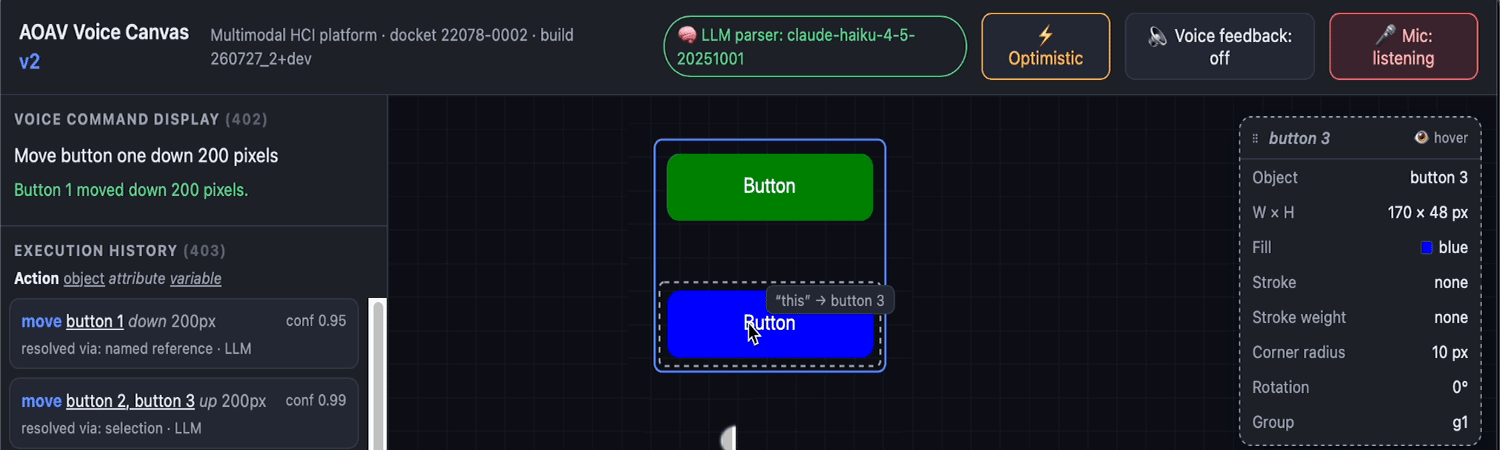
The inclusion of the mouse or not is demonstrating that "THIS" and "IT" are not the same.
"This" and "it" are not synonyms. They reference different things.
The obvious way to build voice selection is to treat every pronoun as "the selected object." It's also wrong, and users feel it immediately.
"This" is deictic, it means the thing I am pointing at right now. So it resolves to whatever the cursor is over, even if something else is selected. "It" is anaphoric, it means the thing we were just talking about. So it resolves to the selection, or failing that, the object from the previous command.
Two pronouns, two input channels: one spatial, one conversational. Getting this right is what makes the interface feel like it's paying attention rather than guessing. A small tag follows the cursor showing exactly what "this" would bind to at that instant, the system's reference, made visible before you commit to a sentence.
Making reasoning legible
How the interface shows its work, and what carries forward.
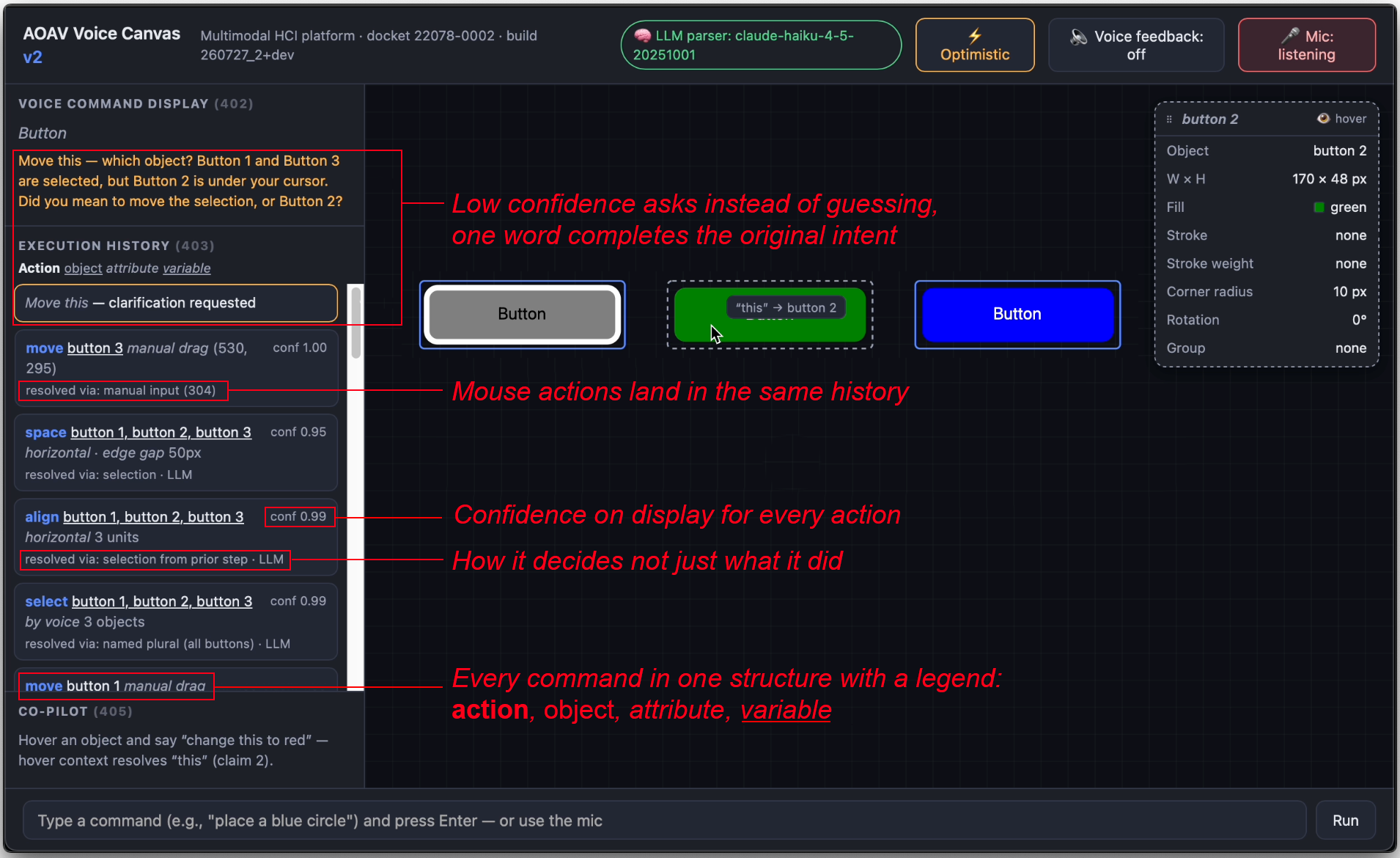
When a system infers, the user needs to see the inference, not just the result. Every command lands in an execution history that records the structured command, a confidence score, and, the part that matters, how the reference was resolved: via mouse hover, via the previous command, via your clarification. A wrong inference becomes visible instead of mysterious.
And when confidence is low, the system asks instead of guessing. "Which object do you mean?" is a better outcome than a confident mistake, provided answering is cheap: one word, and the original intent completes.
Three principles he'd carry into any interface for a reasoning system:
- Pointing and speech resolve different kinds of reference. Don't collapse them.
- Show the resolution, not just the result. Legibility is what makes steering possible.
- Ask when uncertain, make asking cheap. A cheap question beats a confident error.
Get in touch
Let Mø know what you're working on and what you need from design leadership or product innovation.

